

Ah, technical email settings, everyone’s favorite subject… NOT.
I know, this stuff is confusing and you have better things to do, but as a business owner, you should have a basic understanding of what this is and why you need it.
On November 5, 2026, Outlook, Hotmail, Live and MSN email services started rejecting emails from accounts that did not have a DMARC record.
As of May 2025, Microsoft’s policy has been to require SPF, DKIM, and a DMARC record (p=none minimum) for bulk senders (people sending 5,000+ emails per day).
The problem was that on November 5, this was suddenly applied to even low volume senders, meaning that one email your client was waiting on might have been rejected just because you didn’t have a TXT record at your domain.1
Apparently, this new setting was an accident… (?)
According to EasyDMARC:
“Our read: the faulty spam rule weighed the absence of a DMARC record heavily enough to block otherwise authenticated mail. Microsoft has called it a false positive and rolled it back.”2

So what is a DMARC record?
It’s a TXT (informational) record attached to your domain name that tells email providers how to verify an email was actually sent by you (your domain), and what to do if it wasn’t (i.e. a scammer impersonating you, which is known as email spoofing).
It’s best practice to include this record, and we create it when we set up Google Workspace accounts for clients. However, if you’ve had your business email for a few years, or you set up your email yourself, there’s a good chance it was never added.3
How to Check Your Domain
Click the button below to open a free DMARC record checker tool in a new tab. Then enter your domain (yourbusiness.com) and click ‘Check DMARC’. It will show your existing record (if one exists) and a breakdown of its settings.
How to Add a DMARC Record to Your Domain
If your domain does not have a DMARC record, you can add one via the following steps:
- Log in to your registrar (where your domain is registered).
- Select the domain name you’re using for your email.
- Find the DNS configuration area (the list of current DNS records).
- Add a new record with the values below.
Difficulty Level: Easy
If you do not have this record at all, the bare minimum is:
| TYPE | HOST / NAME | VALUE | TTL |
|---|---|---|---|
| TXT | _dmarc | v=DMARC1; p=none; | Auto / Default |
All this does is say that a record exists (v), and that your enforcement policy (p) is to monitor emails sent by your domain. You can safely add this record to your domain as-is, since it won’t quarantine or reject any emails. But it will tell Microsoft that you do, in fact, have this record, in case they ever mess this up again.
More importantly, it’s a good security practice, but only if you start enforcing an actual policy (keep reading).
Difficulty Level: Medium
Ideally your DMARC record includes an email address to designate where reports should be sent.
I’d recommend setting up an email alias (forwarding email), such as [email protected]. Then set up a filter in Gmail to label emails sent to that address as ‘DMARC Reports.’
If you do that, you can use the record below – just make sure to change the email address in the record to whatever you set up. And don’t forget to test the new email address first.
| TYPE | HOST / NAME | VALUE | TTL |
|---|---|---|---|
| TXT | _dmarc | v=DMARC1; p=none; rua=mailto:[email protected]; | Auto / Default |
Monitor those report emails for a few weeks to identify legit sending services (how to do that is outside the scope of this post).
IMPORTANT NOTE: never set a ‘quarantine’ or ‘reject’ policy without thorough testing first.
The difficulty in setting an actual DMARC policy (a ‘p‘ value that isn’t ‘none‘) is the longer you’ve been in business, the more likely it is you’re using sending services you don’t remember.
It’s not just your inbox that’s sending emails. What about your website? Email marketing software, maybe invoicing or CRM, the sales tool from years ago you forgot about, etc. If you don’t explicitly say those services have permission to send email from your domain, your DMARC policy might start rejecting legitimate emails.
Once you have a policy in place, you’ll also need to remember to add any new sending services in the future.
DMARC Deep Dive
You can use this free DMARC record generator to create your DMARC record, but it will feel technically overwhelming, as you can end up with a lot of values.
Here’s a breakdown of the most common components in a DMARC record:
| TAG | REQUIREMENT | EXAMPLE VALUE | POSSIBLE VALUES | FUNCTION |
|---|---|---|---|---|
| v | Required | v=DMARC1 | DMARC1 | Identifies the TXT record as DMARC version 1. Must always be the first tag. |
| p | Required | p=reject | none, quarantine, reject | Sets the enforcement policy for the root domain (none = monitor only, quarantine = send to spam, reject = block completely). |
| sp | Optional | sp=reject | none, quarantine, reject | Sets the enforcement policy for subdomains. Defaults to the p= value if omitted. |
| rua | Optional | rua=mailto:[email protected] | mailto: email | Where to send daily XML aggregate reports (pass/fail stats). Separate multiple addresses with commas. |
| pct | Optional | pct=100 | 0-100 | Percentage of failing emails that the quarantine or reject policy applies to (default is 100). Useful for gradual rollouts. |
Here’s a written DMARC example:
Let’s say you start a new business, so you buy a domain (antimagicswords.com), and set up a Google Workspace email account ([email protected]). While setting up that account you add the following DMARC record at antimagicswords.com:
v=DMARC1; p=reject; sp=reject; rua=mailto:[email protected]; pct=100;What Those Values Mean:
- v=DMARC1: Tells email providers, “these are the official DMARC rules for antimagicswords.com.” All the following lines are the instructions.
- p=reject: Instructions: if an email claims to be from @antimagicswords.com but fails security checks (meaning it’s likely a scammer or spoofing attempt), block it completely. Don’t send it to spam, just delete it before it reaches the recipient’s inbox.
- sp=reject: Instructions: apply the same rule to any subdomains (like @mail.antimagicswords.com or @support.antimagicswords.com), preventing scammers from faking sub-addresses.
- rua=mailto:[email protected]: Instructions: send daily summary reports here, (so you can see who is sending email on your behalf and how many fake emails were blocked).
- pct=100: Instructions: apply this rule to 100% of incoming emails claiming to be from the domain.
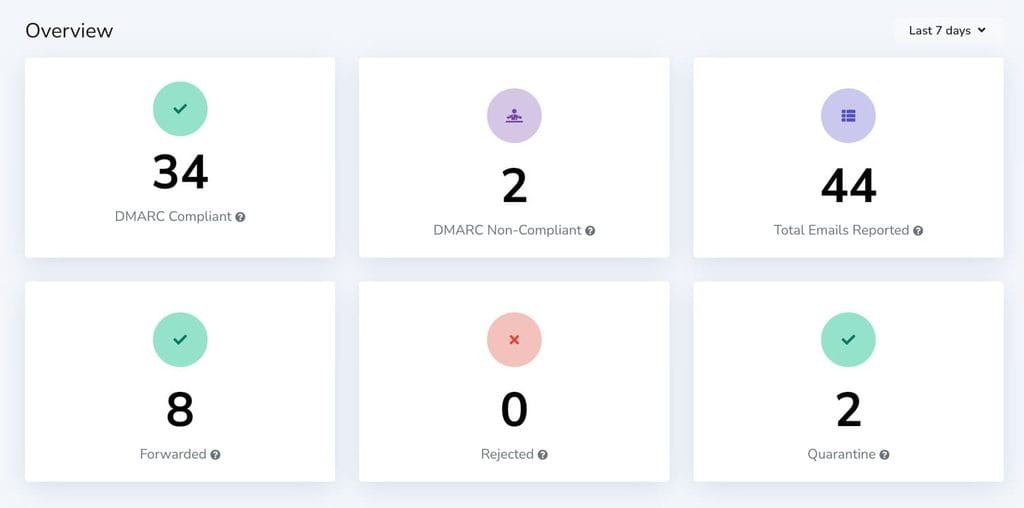
Example DMARC Report Overview
If the domain is using a hosted DMARC service that generates reports inside a dashboard, the rua value might be an weird looking email address like [email protected].
(Paid) services like this can be handy for a visual overview, but they aren’t necessary.
That’s the breakdown! And the most times I have ever used DMARC in a single piece of writing.
Hopefully this has been a helpful. Email deliverability is not one of our core services, but we set up a lot of Google Workspace accounts. The screenshot above is from a DMARC reporting service that I set up on occasion for hosted website clients.
Footnotes:
- The DMARC record requirement breakage is unrelated to the recent Microsoft 365 breakage. ↩︎
- EasyDMARC’s full article is a good read: Microsoft Briefly Rejected Mail From Domains Without DMARC. Here’s What We Know. In it, they advocate for more than the bare minimum record I shared above, and I don’t disagree. But in the real world, the average small business owner I work with does not have the time or knowhow to spend analyzing DMARC reports, so I still think the basic record is better than nothing. ↩︎
- Actually, there are 3 records that are probably missing from your business email domain (SPF, DKIM, and DMARC). I’ll cover the other two at a different time – this is enough acronyms for one day. ↩︎
